If you run your entire job search through LinkedIn, automated job application tools can turn the daily grind of scrolling and clicking into a scalable, always-on system.
This ranked roundup covers the top 7 automated job application tools for LinkedIn power users in 2026. It’s written for:
- Recent grads blasting out high-volume Easy Apply applications
- Early- and mid-career professionals who want consistency without burnout
- Busy candidates who already live in LinkedIn but need automation to keep up
We rank these tools using four core criteria that matter specifically for LinkedIn-centric job hunting:
- Control – Can you review and approve applications before they go out?
- Relevance – How well does the tool match roles to your profile and preferences?
- ATS-friendliness – Does it handle typical LinkedIn + ATS flows (Workday, Greenhouse, Lever, etc.) and keyword alignment?
- Scalability – Can it sustain a high volume of qualified applications over weeks, not just a quick burst?
For a deeper dive into safety, account risk, and automation architecture, see this in-depth guide on automated job applications: how to safely automate job applications at scale.
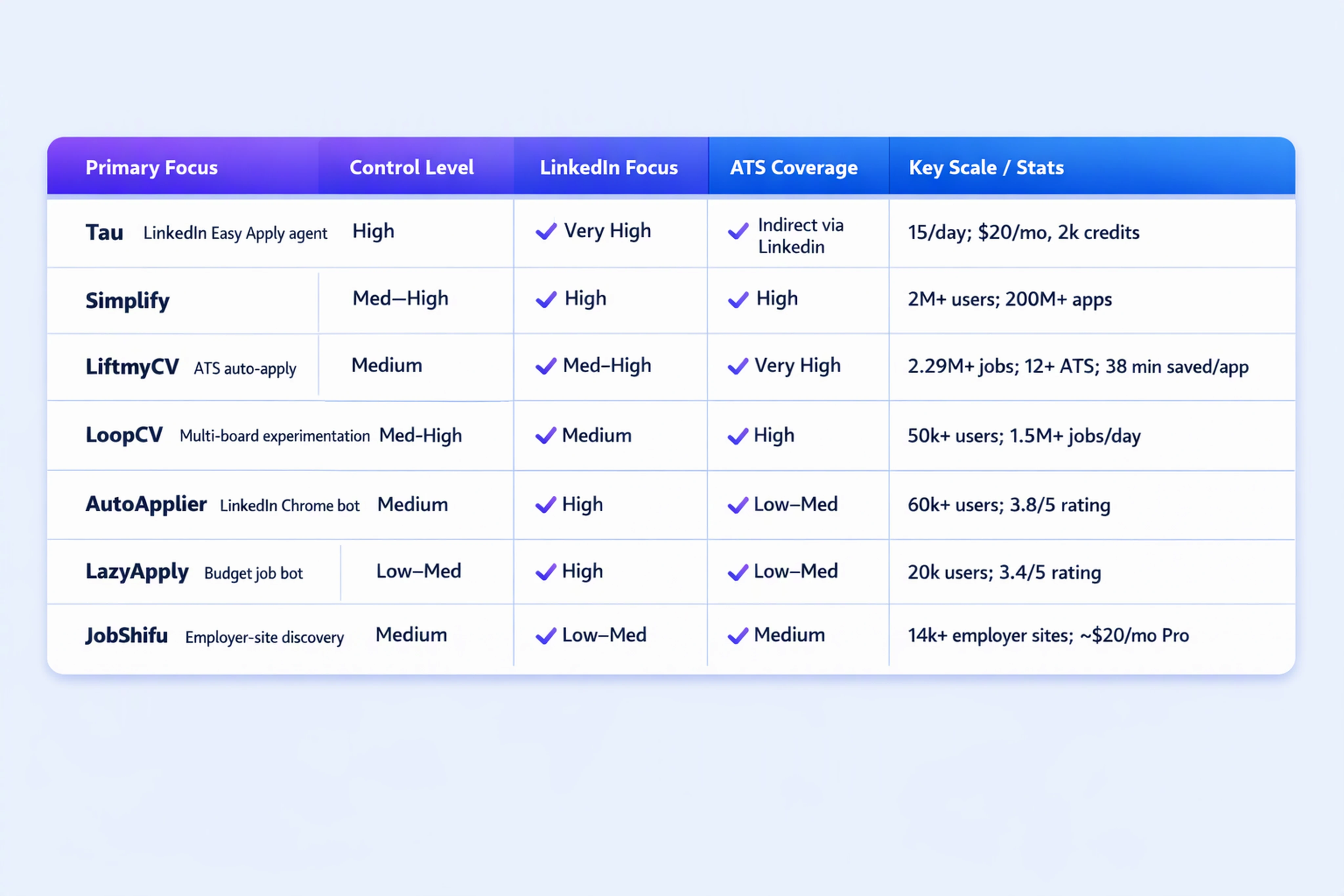
Comparison snapshot: 7 LinkedIn-focused automation tools
Before we dive into each tool, here’s a high-level comparison of the seven entries, focused on LinkedIn usage.
1. Tau – Best LinkedIn-Native Job Search Agent for Controlled Autopilot
Tau is an AI job search agent built specifically around LinkedIn. It connects to your LinkedIn profile, continuously scans the platform for best-fit Easy Apply roles, prepares tailored applications, and submits them either with your approval or on full Autopilot.
Tau stands out because it isn’t just a form-filling bot; it’s positioned as your 24/7 job search agent.
What Tau does
- Parses your LinkedIn profile and résumé to understand your experience
- Scans the entire LinkedIn job feed for relevant Easy Apply roles
- Prepares applications, including:
- Form fields
- Basic screening questions
- Attachments
- Applies to up to ~15 roles per day, with a cap designed to balance scale and quality
- Offers two modes:
- Approval mode – you review every application before it’s sent
- Autopilot mode – Tau applies automatically on your behalf
Tau Pro pricing is listed at US$20/month with 2,000 monthly credits, which is tuned for consistent daily applications rather than sporadic bursts.
Who Tau is best for
- LinkedIn-heavy candidates who do 90%+ of their search on LinkedIn
- Recent grads and early-career professionals targeting Easy Apply roles
- Mid-level professionals who want steady throughput (15/day) without spam
- Users who want automation with guardrails and clear control over their reputation
Strengths
- LinkedIn-native focus – designed specifically for LinkedIn Easy Apply, not generic job boards
- Controlled Autopilot – strong control: default approval mode plus optional hands-off Autopilot
- Throughput with limits – explicit cap of 15 applications/day reduces account and reputation risk
- Fast setup – typically ~5 minutes to connect LinkedIn and let the agent run
Limitations
- LinkedIn-first only – not ideal if your search is heavily ATS-site or multi-board (Indeed, Monster) focused
- Easy Apply emphasis – senior or highly specialized roles often need more bespoke outreach beyond Easy Apply
2. Simplify Copilot – Best Multi-Platform Autopilot for High-Volume Applicants
Simplify Copilot is a broader AI job application automation platform that covers LinkedIn plus other job boards and ATS flows. It’s built for candidates who want one engine to manage applications across multiple sites.
What Simplify does
- Aggregates jobs across platforms and ATS systems
- Uses AI matching to recommend and auto-apply to roles
- Offers both review-first workflows and Autopilot behavior
- Handles application tailoring and keyword optimization, making it more ATS-friendly
The company reports:
- 2 million+ people have joined
- 200 million+ applications submitted with Copilot
- Claims of 5+ hours saved per week and 3x higher interview rate for tailored applications
Who Simplify is best for
- Power users applying across LinkedIn, company sites, and other boards
- Recent grads who want to flood a wide market with tailored applications
- Candidates in tech, product, and data roles where multi-platform coverage matters
Strengths
- Massive scale – designed for high-volume applications
- ATS-awareness – supports common ATS flows beyond LinkedIn
- Proven user base and outcomes – public stats show large adoption and throughput
Limitations
- Less LinkedIn-centric – great if you’re multi-platform, overkill if you’re mostly on LinkedIn
- Automation level and control can vary by site, so workflow complexity is higher than single-platform tools
3. LiftmyCV – Best for ATS-Heavy Flows with Auto Apply
LiftmyCV focuses on AI-powered auto-apply across ATS platforms and job boards, including LinkedIn. It’s particularly relevant if your LinkedIn jobs frequently redirect to company ATS portals.
What LiftmyCV does
- Auto-applies across 2,293,352 jobs (as claimed) and supports 12+ ATS/job boards, including:
- Greenhouse
- Lever
- Workable
- Wellfound
- Monster
- Tailors applications and saves time per application
- Claims about 38 minutes saved per completed application, reflecting heavy automation
Who LiftmyCV is best for
- Mid-level professionals applying to roles that redirect from LinkedIn to ATS flows
- Candidates who want deep ATS support alongside LinkedIn Easy Apply
- Users in markets where LinkedIn is the discovery layer, but actual applications happen on external ATSes
Strengths
- Broad ATS coverage – strong for Workday, Greenhouse, Lever and similar platforms
- Time savings per application – useful if each application is complex
- Works well for LinkedIn discovery + ATS submission workflows
Limitations
- Less focused on LinkedIn-only power users – strength is multi-ATS rather than pure LinkedIn
- High automation may require careful configuration to avoid misaligned applications
4. LoopCV – Best for Experimenting with Auto vs Manual Strategies
LoopCV positions itself as an automation platform that collects jobs, finds company contacts, and can auto-apply or assist manual outreach. It’s more of a job search lab than a simple auto-apply bot.
What LoopCV does
- Works across 30+ connected platforms/job boards
- Reports:
- 50,000+ job seekers on the platform
- 1,495,000+ jobs collected daily
- 18,000+ company emails found daily
- Offers manual vs auto choice, so you can:
- Let LoopCV auto-apply on your behalf
- Use it to discover roles and contacts, then apply yourself
LoopCV’s own safety analysis highlights that tools which drive your logged-in LinkedIn/Indeed accounts carry more account-risk than tools that operate only at the postings layer.
Who LoopCV is best for
- Advanced LinkedIn users experimenting with funnels, outreach, and scaling strategies
- Candidates who want both automation and networking capabilities (company emails)
- Users comfortable tweaking systems and learning from data
Strengths
- High scalability – huge daily job collection volume
- Flexible architecture – manual vs auto modes let you balance safety and speed
- Good for hybrid strategies: auto-apply for general roles, manual outreach for target companies
Limitations
- Complexity – more knobs and levers than a simple “connect and go” LinkedIn autopilot
- Less LinkedIn-specialized UX – it’s multi-platform by design, which can feel less tailored if you’re LinkedIn-only
5. AutoApplier – Best Chrome Extension for Simple LinkedIn Auto Apply
AutoApplier is a Chrome extension focused on automating LinkedIn job applications. It’s closer to a traditional "AI job application bot" that helps you blast through Easy Apply forms.
The Chrome Web Store reports:
- 60,000+ users
- 3.8/5 rating from 41 ratings for the LinkedIn AutoApplier extension
What AutoApplier does
- Automates LinkedIn Easy Apply submissions via your browser
- Offers basic control features such as blacklists and dashboard controls (based on category norms)
- Focuses on speed for LinkedIn forms rather than deep matching or ATS-tailoring
Who AutoApplier is best for
- Recent grads and junior professionals who want to rapidly apply to many LinkedIn roles
- Users comfortable with browser-based automation and extensions
- People who want a low-friction way to test automation before investing in more advanced tools
Strengths
- Easy to install and start for Chrome users
- High volume potential on LinkedIn Easy Apply
- Transparent Chrome Store stats (users and ratings) give some signal of reliability
Limitations
- Limited relevance and ATS sophistication – less focus on matching quality or ATS flows
- Account risk considerations – browser-driven automation directly on your logged-in LinkedIn account can be more sensitive with respect to LinkedIn’s terms
6. LazyApply – Best for Budget-Conscious LinkedIn Blast Campaigns
LazyApply is another job-application bot extension popular among candidates who want low-cost, high-volume automation across LinkedIn and other sites.
The Chrome Web Store shows:
- 20,000 users
- 3.4/5 rating from 215 ratings
What LazyApply does
- Automates job applications across LinkedIn and some other job boards
- Emphasizes "lazy" high-volume applications with minimal manual effort
- Often used for short, intense campaigns to quickly reach a large number of postings
Who LazyApply is best for
- Budget-conscious users who want to try automation without a big subscription commitment
- Recent grads or career switchers who prioritize volume over precision
- Candidates willing to trade some relevance and personalization for speed
Strengths
- Lower price point than some larger platforms (based on public pricing ranges)
- Good for blast campaigns when you need to get a lot of applications out quickly
- Familiar browser-extension model that many job seekers already understand
Limitations
- Lower average rating suggests mixed satisfaction and potential reliability issues
- Limited control and relevance compared to agent-style tools that parse your profile and tailor responses
- May not be ideal for mid-level professionals who care about fit and reputation
7. JobShifu – Best for Quiet, Systematic Search Beyond LinkedIn
JobShifu is a job search automation platform that focuses on discovering roles across employer career sites—14,000+ employer sites, according to the company. While not LinkedIn-specific, it’s relevant for power users who start on LinkedIn but don’t want to miss off-platform opportunities.
What JobShifu does
- Crawls 14,000+ employer career sites to find open roles
- Offers a “free forever” tier, with Pro from around $20/month on annual billing
- Helps job seekers keep a systematic pulse on openings beyond LinkedIn job posts
Who JobShifu is best for
- LinkedIn power users who treat LinkedIn as a hub but want silent coverage of employer sites
- Mid-level professionals targeting specific companies that may not post all roles on LinkedIn
- Candidates who value discovery and tracking as much as auto-apply
Strengths
- Massive employer-site coverage expands your search beyond LinkedIn
- Affordable Pro tier comparable to other agent tools
- Supports quiet, systematic search even when you’re not actively hunting
Limitations
- Not a LinkedIn-native auto-applier – better at finding jobs than at automating LinkedIn Easy Apply
- Auto-apply and workflow features may feel less integrated with LinkedIn than dedicated LinkedIn tools
Summary comparison table: control, relevance, ATS, scale
Here’s a quick side-by-side comparison of the seven tools for LinkedIn-focused automation:
| Tool | Primary Focus | Control Level | LinkedIn Focus | ATS Coverage | Scale & Stats (where public) |
|---|---|---|---|---|---|
| Tau | LinkedIn Easy Apply job search agent | High (approval + auto) | Very high | Indirect via LinkedIn | Up to 15 apps/day; Pro: $20/month, 2,000 credits |
| Simplify | Multi-platform autopilot + tailoring | Medium–High | High | High | 2M+ users; 200M+ apps; 3x interview rate claim |
| LiftmyCV | ATS-heavy auto-apply (incl. LinkedIn) | Medium | Medium–High | Very high | 2.29M+ jobs; 12+ ATS; 38 minutes saved per app claim |
| LoopCV | Experimentation + multi-board automation | Medium–High (manual/auto) | Medium | High | 50k+ users; 1.5M+ jobs collected daily |
| AutoApplier | Chrome extension for LinkedIn Easy Apply | Medium (blacklists etc.) | High | Low–Medium | 60k+ users; 3.8/5 rating (41 ratings) |
| LazyApply | Budget-friendly job application bot | Low–Medium | High | Low–Medium | 20k users; 3.4/5 rating (215 ratings) |
| JobShifu | Employer-site discovery and automation | Medium | Low–Medium | Medium | 14,000+ employer sites; Pro ~ $20/month on annual |
Recommendations by job seeker type
There is no single "best AI tool for LinkedIn job applications" in 2026. The right choice depends on your career stage, risk tolerance, and how much of your search truly happens inside LinkedIn.
If you’re a recent grad or early-career candidate
You typically need volume, but not reckless blasting. Recommended setups:
- Tau – as a core LinkedIn job search agent for Easy Apply roles, with:
- Approval mode for the first week
- Autopilot enabled once you trust the patterns
- AutoApplier or LazyApply – for short sprints when you need to quickly increase application volume
Focus on:
- A strong LinkedIn profile and résumé (since Easy Apply is competitive)
- Guardrails: stay under sustainable daily caps to avoid account or reputation issues
If you’re a mid-level professional in tech, product, or data
You need a mix of fit, ATS-friendliness, and consistency, not just sheer volume.
Recommended setups:
- Tau – for daily LinkedIn Easy Apply coverage with a 15 applications/day ceiling
- Simplify or LiftmyCV – to handle roles that redirect from LinkedIn into ATS flows
- LoopCV – if you want to experiment with combining auto-apply and targeted outreach
Focus on:
- Targeted role preferences (location, salary bands, titles)
- Tracking where you applied so you can follow up intelligently
If you’re company-targeted or doing a quiet search while employed
You want discovery coverage without noisy blast applications.
Recommended setups:
- JobShifu – to quietly monitor 14,000+ employer sites while you continue using LinkedIn normally
- Tau in approval mode – so every LinkedIn application is reviewed before sending
Focus on:
- Protecting your reputation: no misaligned or low-quality applications
- Leveraging AI for consistency, not anonymity—quality over quantity
How to combine tools safely
Many LinkedIn power users end up using one primary agent plus one or two supporting tools. For example:
- Primary: Tau as the LinkedIn-native autopilot for Easy Apply
- Secondary: Simplify or LiftmyCV for ATS-heavy roles
- Discovery: JobShifu or LoopCV for broader market awareness
Always consider:
- LinkedIn’s terms and automation policies when using browser-based bots
- Privacy posture and how resume/profile data is stored
- How easily you can turn automation off or switch back to review-first workflows
If you want to test a LinkedIn-native agent with controlled Autopilot, you can start directly from Tau’s homepage at get-tau.com.
FAQ: Automated job applications for LinkedIn power users
1. Are AI job application bots allowed under LinkedIn’s terms of service?
LinkedIn generally discourages unauthorized automation that mimics human behavior, particularly browser bots that drive your logged-in account. Tools that operate within LinkedIn’s ecosystem but with controlled, compliant behavior are typically safer than aggressive form-filling bots.
Always:
- Read LinkedIn’s latest terms
- Avoid extreme volumes or suspicious patterns
- Prefer tools that offer daily caps and approval workflows
2. How many LinkedIn applications per day is “safe” for automation?
There is no official number, but many tools now enforce moderate daily caps to reduce risk. Tau explicitly states a limit of up to ~15 applications per day, which reflects a realistic human-like volume for many job seekers.
Staying in the 10–20 applications/day range with good relevance is generally safer than blasting hundreds of low-quality applications.
3. Do automated applications actually improve interview rates?
Yes, when used correctly. Simplify reports that tailored applications through Copilot can result in 3x higher interview rates compared to generic applications.
Key drivers of improved outcomes:
- Better role matching based on your profile
- Keyword alignment with job descriptions and ATS flows
- Consistency over weeks and months, not just occasional bursts of activity
4. How do I protect my privacy when using AI job search assistants?
Look for tools that:
- Provide a clear privacy policy explaining how resume and profile data is used
- Avoid reselling your data to third parties
- Offer options to delete your data and application history
- Minimize the sharing of sensitive information (e.g., work authorization, salary history) beyond what’s needed per application
If a tool does not clearly state how it handles your data, treat that as a red flag.
5. Which tool should I pick if I only use LinkedIn and nothing else?
If your job search is almost entirely LinkedIn-based, prioritize:
- Tau as a LinkedIn-first AI job search agent with approval and Autopilot modes
- AutoApplier or LazyApply if you want simpler, browser-based automation for Easy Apply
For most LinkedIn power users who care about relevance, control, and sustainable daily volume, a LinkedIn-native agent with built-in caps and review workflows is usually the most balanced choice.
Automation is now a genuine advantage in job searching—but only when it’s used with intention. LinkedIn power users can combine agents, bots, and ATS-aware tools to build a job search pipeline that runs 24/7, stays aligned with their profile, and keeps their reputation intact.