If you’re choosing between Tau and Aiapply for AI job application automation, the practical split is simple:
- Tau is best if your priority is LinkedIn-first, lower-risk, better-matched Easy Apply applications with tight control.
- Aiapply is best if you want maximum volume across many job boards, plus resume, cover letter, and interview prep in one stack.
This guide breaks down Tau vs Aiapply on the criteria that actually matter:
- How they find roles
- How they fill forms and submit applications
- How they personalize your applications
- How they manage risk and privacy
- Which tool fits different job search goals
Tau vs Aiapply at a Glance
| Criterion | Tau (LinkedIn-native agent) | Aiapply (multi-site job bot) |
|---|---|---|
| Primary focus | LinkedIn Easy Apply automation from your own LinkedIn account | Cross-platform applications across job boards, career sites, and LinkedIn URLs |
| Role discovery | Scans LinkedIn vacancies, hiring posts, and hiring managers for best-fit roles | Pulls >1M jobs/month into its own board, scans thousands of sources, plus supports LinkedIn URLs |
| Form filling | Completes LinkedIn Easy Apply flows directly inside LinkedIn | Handles simple and multi-step forms across many sites using stored profile and answers |
| Personalization | Tailors resume (Pro), drafts manager notes (Max), focuses on best-fit matches | Tailors resume + cover letter per posting; adds resume builder, application kit, mock interviews |
| Volume | 5 / 10 / 15 applications per day, aimed at quality and safety | Up to ~70 applications per day for broad reach |
| User control | Default: you approve each application; Autopilot optional on higher tiers | Review, Hybrid, and Auto modes with dashboard to inspect documents |
| Risk posture | Explicitly warns that LinkedIn automation is never risk-free; optimized for slower, authentic activity | Encourages “assistive” AI on LinkedIn, pushes heavy Auto Apply across non-LinkedIn sources |
| Best for | Candidates who want LinkedIn-first search, fewer but better-matched apps, and controlled Autopilot | Candidates who want one high-volume stack for applications, tailoring, and interview prep |
For a deeper background on how AI job applier tools behave on LinkedIn, see this in-depth guide: Automatically apply to jobs: what AI job applier tools actually do on LinkedIn.
Criterion 1: How They Find Roles
Tau: LinkedIn-native role discovery
Tau positions itself as an AI job search agent living inside LinkedIn. Once you connect your LinkedIn account, it:
- Parses your LinkedIn profile and resume to understand your skills, titles, and target domains.
- Scans LinkedIn for:
- Standard job postings
- "Hiring" posts
- Hiring managers advertising open roles
- Prioritizes Easy Apply roles that are a best-fit for your profile, not just anything that vaguely matches a keyword.
Tau’s own site emphasises “scans the whole LinkedIn for best-fit vacancies” and “finds Easy Apply jobs that fit your resume.” The engine is tuned for relevance first, then volume.
Aiapply: Multi-source, high-volume role intake
Aiapply works as a cross-platform job application engine rather than a LinkedIn-only agent. It:
- Pulls more than 1 million jobs per month into its internal job board.
- Claims access to 20M+ roles across thousands of external sources.
- Lets you paste LinkedIn job URLs in, but LinkedIn is just one of many inputs.
- Ranks roles against your criteria to support high-volume Auto Apply (up to 70 applications per day).
This breadth is a genuine strength: if you’re hunting across multiple job boards and company career sites, Aiapply can fill your pipeline across the wider web.
What this means in practice
-
Choose Tau if:
- LinkedIn is your primary job-hunting battlefield.
- You care more about fit and authenticity than hitting maximum daily applications.
-
Choose Aiapply if:
- You want to spray intelligently across many sites.
- You’re optimizing for coverage and reach beyond LinkedIn.
Criterion 2: Form Filling and Application Submission
Tau: Works from your actual LinkedIn account
Tau uses a connected browser session and your LinkedIn cookies to behave like you inside LinkedIn. Once you’re set up (often in under 5 minutes), Tau:
- Enters your details into LinkedIn Easy Apply forms.
- Handles screening questions and checkboxes inside the native LinkedIn flow.
- Attaches your resume and any configured materials when required.
On most plans, Tau caps applications at 5, 10, or 15 per day. That ceiling is by design: Tau is trying to keep behavior closer to how a real user would apply, and limit risk of “bot-like” activity.
Aiapply: Handles multi-step forms everywhere
Aiapply’s Auto Apply is built to tackle complex, multi-step application flows across different sites. According to its help docs, it:
- Completes simple and extended forms with stored profile information.
- Uses an Answer Library for recurring questions (e.g., salary expectations, work authorization).
- Navigates multi-page application flows on external career sites.
Aiapply can submit up to 70 applications per day, which is far above Tau’s caps. This makes Aiapply a better match for high-volume form filling across many platforms, including roles that go way beyond LinkedIn Easy Apply.
Submission approach on LinkedIn
There’s an important nuance:
- Tau openly states that it automates LinkedIn applications from your account, while warning that LinkedIn doesn’t permit bots or “unauthorized automated methods.”
- Aiapply’s own guidance suggests using AI for matching and tailoring, then keeping the final LinkedIn click more manual in “safer” workflows, and using heavy Auto Apply primarily on non-LinkedIn sites.
If you want a tool whose core job is to operate inside LinkedIn Easy Apply, Tau is built exactly for that scenario.
Criterion 3: Personalization of Applications
Tau: Targeted tailoring for LinkedIn Easy Apply
Tau’s personalization is focused and practical:
- Resume tailoring on Pro: Tau can adapt your resume for better alignment with target LinkedIn roles.
- Manager notes on Max: Tau drafts short notes to hiring managers when applicable.
- Best-fit role matching: The engine avoids random mass applications and prioritizes roles that map cleanly to your profile.
Crucially, Tau’s default workflow shows you each role before sending, so you can:
- Confirm fit
- Adjust or swap resumes
- Decide whether to allow Autopilot for certain types of roles
This reinforces Tau’s quality and control positioning.
Aiapply: Full-stack personalization and interview support
Aiapply goes significantly broader on personalization:
- Resume builder and tailored resumes for each posting.
- Cover letter generation, custom to each role.
- An application kit that standardizes your answers and materials.
- Mock interviews and live interview help.
Aiapply is not just an auto applier; it’s closer to an end-to-end job search suite. If you need cover letters for non-LinkedIn applications or want integrated interview prep, Aiapply brings those extras in one platform.
Who benefits from which kind of personalization?
-
Choose Tau if:
- Most of your target roles are LinkedIn Easy Apply.
- You want lightweight tailoring inside LinkedIn, not a full new resume workflow.
-
Choose Aiapply if:
- You frequently need role-specific resumes and cover letters.
- You want interview practice tools in the same product as your auto applier.
Criterion 4: Risk Management, LinkedIn Rules, and Privacy
LinkedIn’s stance on automation
Both tools operate against the backdrop of the LinkedIn User Agreement, which prohibits:
- Bots or any automated methods that access or use the service without permission.
- Patterns of activity that look inauthentic or automated.
Tau’s safety guide notes several practical realities:
- LinkedIn can pause Easy Apply after rapid submissions.
- It may reduce your application limit if activity seems bot-like.
- It can restrict accounts temporarily or permanently for automation.
- LinkedIn does not publish a safe number of applications per day.
This context matters no matter which tool you choose.
Tau: Conservative, LinkedIn-aware risk posture
Tau is unusually explicit about the risks of automation:
- States clearly that no auto-apply tool is risk-free on LinkedIn.
- Emphasizes that even with user approvals, automation is still subject to LinkedIn’s rules.
- Designs its product around lower volume (5–15/day) and better matching, which naturally reduces the chance of triggering limits.
This makes Tau attractive for job seekers who:
- Want the advantages of automation on LinkedIn.
- But also want a vendor that acknowledges and mitigates risk, rather than ignoring it.
Aiapply: Broader operational footprint and proxy use
Aiapply’s privacy and product docs reveal a more extensive infrastructure:
- Dedicated mailboxes and connected assistants.
- Proxy routing for submissions on some third-party platforms.
- Storage of application content and answers inside Aiapply’s system.
While these capabilities enable wide automation across many sites, they come with tradeoffs:
- Your data (resume, answers, application history) is spread across a larger operational network.
- LinkedIn submissions need careful configuration to stay as close as possible to "assistive" rather than fully botted.
Privacy considerations for AI job appliers
When evaluating AI job search tools, ask:
- Where is my resume and profile data stored?
- Does the tool operate directly from my LinkedIn account, or via proxies?
- How transparent is the vendor about automation risks and platform policies?
Tau answers these questions with a LinkedIn-first mindset and explicit safety language. Aiapply answers them with scope and capability across the wider job market, but requires you to pay closer attention to how automation is configured on LinkedIn itself.
Criterion 5: Volume, Pricing, and Realistic Outcomes
Volume caps and throughput
Tau and Aiapply differ most dramatically on volume:
-
Tau
- Starter: up to 5 applications/day
- Pro: up to 10 applications/day
- Max: up to 15 applications/day
-
Aiapply
- Auto Apply can submit up to ~70 applications/day across sites.
- Claims 703,461 interviews landed and that 76% of users get an interview in the first 10 days.
- Says 2,064,348+ experienced job seekers use the platform.
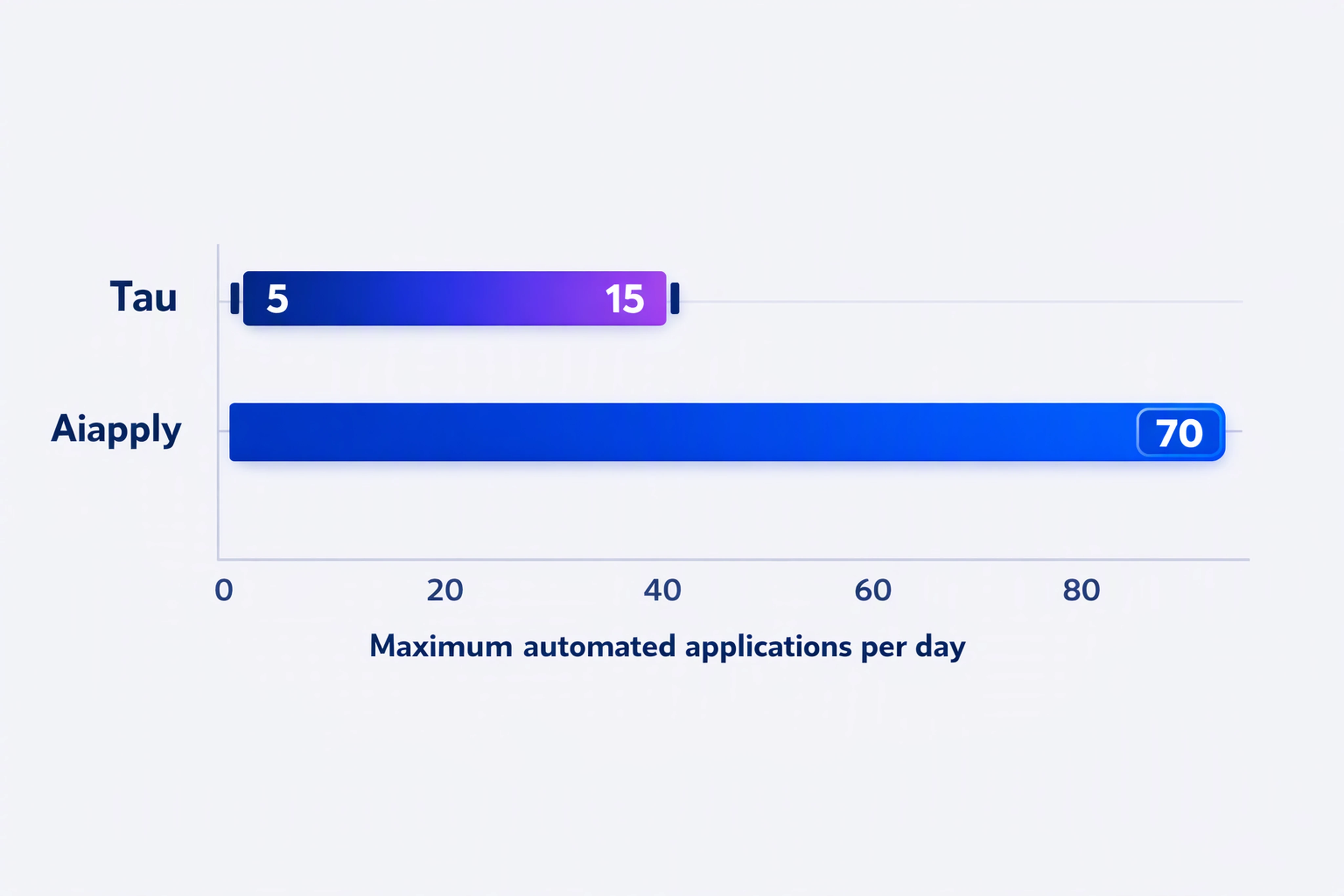
These numbers highlight the strategic trade-off: Tau is about steady, believable LinkedIn activity; Aiapply is about maximum reach and interview volume.
Pricing snapshots (subject to change)
- Tau lists monthly plans at $49 / $99 / $199 (Starter / Pro / Max), tied to daily caps and features, each with a 5-day free trial.
- Aiapply’s pricing varies by region and plan, often scaling with features like Auto Apply, interview tools, and document generation.
Always check each vendor’s latest pricing page before deciding.
Which Tool Fits Different Job Search Goals?
Use Tau if…
You’re primarily a LinkedIn job hunter and want:
- LinkedIn-native automation that feels like an extension of your profile.
- A job search agent that works in the background on a schedule and keeps Easy Apply momentum going.
- Fewer but higher-quality applications with strong role fit.
- The option to choose between approval workflow and Autopilot.
- A vendor that is frank about LinkedIn automation risk, with daily caps that protect your account.
Use Aiapply if…
You want a broad job search stack that operates across many sites and includes more tooling:
- High-volume Auto Apply (up to 70/day) to saturate your pipeline.
- A single platform for resume building, cover letters, and interview prep.
- The ability to target roles on multiple boards and corporate career sites, not just LinkedIn.
- A dashboard where you can inspect exactly what documents and answers were submitted.
Blended strategy: where each can sit in your stack
Some job seekers combine tools:
- Use Tau to run a LinkedIn Easy Apply autopilot with careful limits.
- Use Aiapply or similar platforms to expand reach on Indeed, company career sites, and regional job boards.
If you go this route, be thoughtful about overlapping automation on LinkedIn to avoid doubling up bot-like activity.
Other AI Job Application Tools to Consider
Tau and Aiapply aren’t the only options in 2026. If you’re comparing AI job search tools:
- LazyApply – Known for aggressive Auto Apply volume across multiple sites and simple configuration, but with similar LinkedIn automation risk considerations.
- LinkedIn’s own features – Saved searches, job alerts, and Easy Apply filters are not AI autopilot, but they’re low-risk and free.
- Niche AI resume/cover letter tools – If you mainly need document optimization (not automation), specialized tools might be safer and cheaper.
When evaluating alternatives, focus on:
- How they treat LinkedIn automation vs. manual click.
- Whether they offer privacy clarity and data control.
- How well they align with your target markets (US, EU, India, etc.).
Actionable Takeaways
- If LinkedIn is your main battlefield and you’re cautious about automation risk, Tau is the more focused, LinkedIn-native choice.
- If you want a single AI platform that handles mass applications, tailoring, and interview prep across many job sites, Aiapply offers more breadth.
- For many job seekers, the question isn’t “which is better?” but “where do I want automation to work hardest?” (inside LinkedIn or across the wider web).
Before you decide:
- Write down your target role types and locations.
- Decide whether LinkedIn or external boards are your primary source.
- Determine your risk tolerance for automation on LinkedIn.
- Pick the tool whose design philosophy matches that risk tolerance and source mix.
Your AI job search agent should feel like leverage, not a liability.
FAQ: Tau vs Aiapply for AI Job Search Automation
1. Is Tau safer than Aiapply on LinkedIn?
Neither tool can make LinkedIn automation “safe” in the sense of fully compliant with the platform’s ban on bots. Tau is more conservative:
- Lower daily caps (5–15 vs. up to 70).
- Transparent warnings that no auto-apply tool is risk-free.
- A design geared toward LinkedIn-native, authentic-feeling activity.
Aiapply encourages using AI to assist with LinkedIn matching and tailoring while being more aggressive with Auto Apply on external sites.
2. Which tool is better if I need lots of interviews fast?
Aiapply is built for high volume and claims that 76% of users get an interview in the first 10 days. If you’re comfortable with wide reach across many boards and some risk tradeoffs, Aiapply can accelerate volume.
Tau focuses on steady, best-fit LinkedIn applications. You may get fewer total applications, but they’re more targeted and less likely to look spammy to hiring managers.
3. Can Tau or Aiapply guarantee that my LinkedIn account won’t be restricted?
No. Both operate in a space where LinkedIn can restrict or pause accounts it suspects of automation. Tau’s safety guide is explicit that approvals and lower volume do not make automation officially allowed.
The safest strategy is always:
- Keep behavior as close as possible to what a real human would do.
- Avoid extreme spikes in daily applications.
- Stay informed about the LinkedIn User Agreement around bots and automated access.
4. Do I still need to write my own resumes and cover letters?
- With Tau, yes. Tau helps tailor and attach, but does not replace a strong, human-written resume, especially for senior roles.
- With Aiapply, you can generate resumes and cover letters automatically. However, you’ll still get better results if you review and refine what the AI produces.
Think of AI tools as accelerators, not replacements, for thoughtful application materials.
5. What’s the best AI auto apply tool for LinkedIn jobs in 2026?
“Best” depends on your goals:
- For LinkedIn-native, quality-focused automation, Tau is a strong fit.
- For cross-platform, high-volume Auto Apply with full job search tooling, Aiapply is compelling.
- For maximum reach with minimal configuration, LazyApply and similar products are also in the mix.
Define your priorities (LinkedIn focus vs. broad reach, cautious vs. aggressive automation) and choose the tool that aligns with those priorities.