If you want an AI to apply to LinkedIn jobs for you, Tau and LoopCV solve slightly different problems.
- Choose Tau if you care most about control and relevance on LinkedIn Easy Apply.
- Choose LoopCV if you care most about volume and multi‑board coverage at a lower price.
This comparison breaks down Tau vs LoopCV across the criteria that actually decide the choice: control, relevance, volume, safety, and price, then closes with clear recommendations and alternatives.
For a deeper technical explainer of how AI auto‑apply tools work, see this guide: Auto apply to jobs: how AI that applies to jobs for you really works.
Comparison criteria
To keep this fair and useful, we’ll compare Tau and LoopCV on five concrete dimensions:
- Control – How much say you have in each application.
- Relevance – How well the tool targets genuinely suitable roles.
- Volume & coverage – How many jobs it can reach and on which platforms.
- Safety & risk – How each approach lines up with LinkedIn’s policy and practical risk.
- Price & limits – What you pay and how many applications you’re allowed.
Then we’ll add:
- Fit by use case – Who should pick Tau, who should pick LoopCV, and when other tools are better.
Tau vs LoopCV at a glance
| Criterion | Tau | LoopCV | Key takeaway |
|---|---|---|---|
| Control | Approval‑first; optional Autopilot; pauses when info is missing. (get-tau.com) | Auto‑apply or one‑click review; strong filters but more hands‑off modes. (loopcv.pro) | Tau is more human‑in‑the‑loop; LoopCV offers more workflow styles. |
| Relevance | LinkedIn‑native matching to your resume and saved searches; explains fit. (get-tau.com) | Matches across LinkedIn + 30+ boards using filters and CV tailoring. (loopcv.pro) | Tau feels more curated for LinkedIn; LoopCV is broader but less LinkedIn‑specific. |
| Volume & coverage | LinkedIn‑only; focuses on Easy Apply; starter 5/day (100/month), pro 10/day (300/month). (get-tau.com) | LinkedIn, Indeed, Glassdoor, 30+ boards; up to 300 applications/month on Premium. (loopcv.pro) | LoopCV wins on breadth and high throughput; Tau optimizes LinkedIn Easy Apply specifically. |
| Safety & risk | Still subject to LinkedIn’s anti‑automation rules; mitigates risk with tighter control. (get-tau.com) | Same policy exposure; safety varies by mode and whether it touches logged‑in sessions. (blog.loopcv.pro) | Neither is risk‑free; LoopCV’s more aggressive automation can be higher risk in some modes. |
| Price & free tier | 5‑day free trial, then starter at $49/month. (get-tau.com) | Free plan; paid from about €8.99/month; Premium around €29.99/month. (loopcv.pro) | LoopCV is significantly cheaper and easier to test for longer. |
| Social proof | “12,000+” job seekers use Tau agents. (get-tau.com) | “50,000+” users; Trustpilot 3.8 rating from 132 reviews. (loopcv.pro) | LoopCV has more visible public reviews; Tau is newer but growing fast. |
Criterion 1: Control over your applications
How Tau handles control
Tau is built around approval‑first control:
- It scans LinkedIn for Easy Apply roles that match your resume and saved searches.
- It prepares applications, then lets you approve each one or switch to Autopilot.
- Importantly, Tau pauses instead of guessing on critical details like salary expectations, visa status, or custom prompts and asks you for input.
This design is aimed at job seekers who care about:
- Protecting their reputation on LinkedIn.
- Avoiding awkward misfires (e.g., applying to roles that don’t match seniority or salary).
- Keeping a human eye on edge cases while still offloading most of the grunt work.
How LoopCV handles control
LoopCV offers a range of automation modes:
- True auto‑apply mode that can submit applications on your behalf without a review step.
- A one‑click review mode where you vet opportunities before submission.
- Filters for title, location, keywords, seniority, work type, salary, and excluded companies.
You can still impose control, but LoopCV is designed to support higher automation levels across multiple boards. It’s easier to let it run with fewer touchpoints.
Control verdict
- Tau wins if you want a LinkedIn‑native agent that slows down to ask whenever context is missing.
- LoopCV wins if you want the flexibility of both review‑first and fully hands‑off modes across several job boards.
Criterion 2: Relevance of matches
Tau’s approach to relevance
Tau positions itself as an AI job search agent built specifically for LinkedIn:
- It parses your LinkedIn profile and resume, then scores Easy Apply roles for “best‑fit”.
- It uses your saved searches and experience to drive targeting instead of broad keyword matching.
- It explains why a job fits, which is helpful for trust and understanding what the agent is doing.
Because Tau doesn’t try to cover every platform, it can afford to be deliberate:
- Strong alignment with LinkedIn’s job taxonomy.
- Less noise from irrelevant boards or outdated listings.
LoopCV’s approach to relevance
LoopCV emphasizes breadth with filters:
- It searches LinkedIn, Indeed, Glassdoor, and 30+ job boards.
- It uses your CV plus filters (title, location, keywords, salary, etc.) to find matches.
- It can tailor your CV and messages per application, but it’s acting over a larger, more varied dataset.
This is powerful when you want many shots on goal across multiple markets, but relevance depends heavily on how precise your filters are.
Relevance verdict
- Tau is better if you want highly curated LinkedIn Easy Apply matches and you care about explanations and fit.
- LoopCV is better if you want broad coverage and are willing to fine‑tune filters to keep relevance high.
Criterion 3: Volume and coverage
Tau’s volume limits and scope
Tau’s product philosophy favors quality and sustainability over raw volume:
- Starter plan: up to 5 applications/day, capped at 100/month.
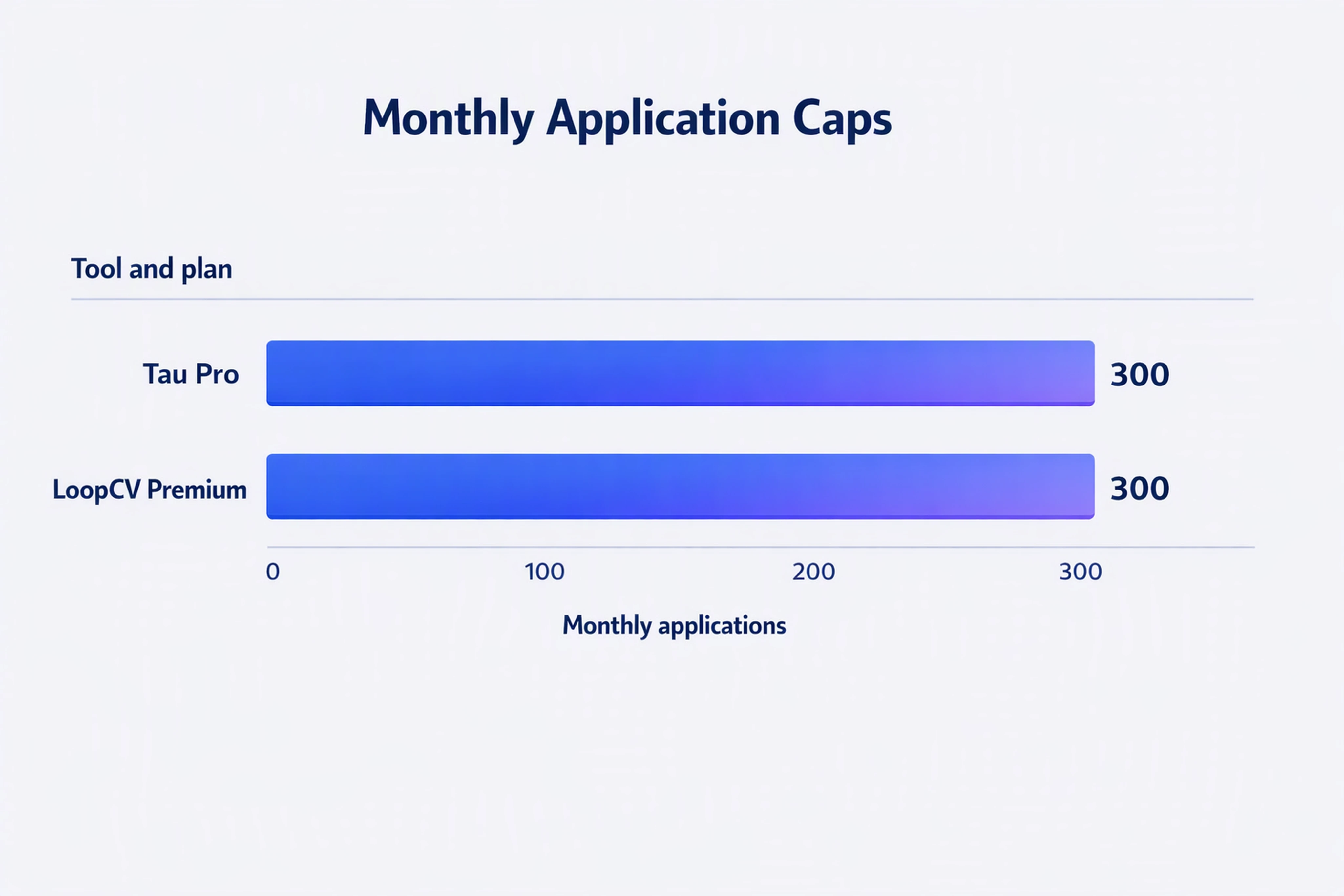
- Pro plan: up to 10 applications/day, capped at 300/month, with up to three searches running at once. (get-tau.com)
- Scope: LinkedIn‑only, tuned for Easy Apply.
This fits job seekers who:
- Want a steady, consistent pipeline without feeling like they’re spamming.
- Believe reply rate matters more than application count, a view echoed in recent vendor comparisons. (applyops.in)
LoopCV’s volume limits and scope
LoopCV is built to be a bulk submission and outreach engine:
- Free/basic tier: up to 10 applications/emails per month.
- Standard: around 100 applications/month.
- Premium: around 300 applications/month. (loopcv.pro)
- Scope: LinkedIn plus Indeed, Glassdoor, and 30+ boards.
It runs in the cloud, making it attractive for:
- Job seekers who want to saturate multiple boards quickly.
- People targeting several roles or regions at once.
Here’s how the monthly caps compare at typical paid tiers.
Volume & coverage verdict
- Tau is better for LinkedIn‑first job seekers who want a realistic daily volume that feels sustainable and targeted.
- LoopCV is better for high‑throughput searchers who want to hit many boards with one engine.
Criterion 4: Safety and LinkedIn policy risk
What LinkedIn actually says about bots
LinkedIn’s user agreement and policy summaries explicitly restrict:
- Bots, crawlers, browser plug‑ins, and extensions that automate activity or scrape data.
- Third‑party tools that interact with your logged‑in session in ways that mimic human behavior. (hyperclapper.com)
That means all auto‑apply tools carry some policy exposure, especially when they:
- Log into your LinkedIn account.
- Autofill forms or trigger Easy Apply submissions for you.
Tau’s safety posture
Tau doesn’t claim to remove risk (no serious vendor can), but it does:
- Emphasize approval‑first workflows and lower daily caps, which reduce suspicious activity spikes.
- Pause on ambiguous cases (salary, visa, etc.) instead of aggressively guessing.
- Publish privacy and safety language that acknowledges automation risk directly. (get-tau.com)
Tau is better only if you want tighter human control, not because it magically makes you policy‑immune.
LoopCV’s safety posture
LoopCV’s own safety guide frames risk around how deeply a tool interacts with your accounts:
- Touching your logged‑in LinkedIn or Indeed session is riskier than just searching postings.
- Browser‑extension style automation is flagged as the higher‑risk end of the spectrum. (blog.loopcv.pro)
Because LoopCV supports true auto‑apply modes and higher throughput, some workflows can look more “bot‑like” to platforms if not carefully configured.
Boutique alternatives and lower‑risk choices
Vendor comparisons increasingly distinguish between:
- Bulk Easy Apply bots (Tau, LoopCV, LazyApply, AIApply, AI Job Agent).
- Boutique tools like Simplify or Teal that focus on discovery, autofill, and tracking rather than mass auto‑submission. (applyops.in)
If your priority is minimizing policy risk, boutique tools are a different category worth considering.
Safety verdict
- Neither Tau nor LoopCV is “risk‑free” under LinkedIn’s anti‑automation rules.
- Tau is better if you want human‑in‑the‑loop control and moderate daily volume.
- LoopCV can be riskier in its more aggressive modes; careful settings (filters, caps) matter.
Criterion 5: Price, limits, and value
Tau pricing and limits
Tau’s pricing is straightforward:
- Free trial: 5 days.
- Starter plan: $49/month, with 5 applications/day and 100/month cap.
- Pro plan: higher volume at 10/day and 300/month, plus more simultaneous searches. (get-tau.com)
You’re paying for:
- A LinkedIn‑native autopilot agent.
- Strong focus on relevance and control.
- Very low friction setup (about 5 minutes to connect LinkedIn and start applications).
LoopCV pricing and limits
LoopCV wins clearly on entry price:
- Free forever plan, no credit card.
- Paid tiers starting around €8.99/month for Standard and around €29.99/month for Premium.
- Pricing pages show slightly inconsistent numbers ("from €9.99/mo" in some places), so it’s worth double‑checking at checkout. (loopcv.pro)
At similar application caps (100–300/month), LoopCV is generally cheaper than Tau.
Price verdict
- LoopCV is the clear budget winner, especially if you want to run it longer than a short free trial.
- Tau is a higher‑priced, LinkedIn‑specific agent, justified if you value its targeting and control.
How Tau vs LoopCV compare to AI Job Agent
While this article focuses on Tau vs LoopCV, many job seekers also ask how AI Job Agent fits in.
AI Job Agent (ai-jobagent.com) sits closer to LoopCV in philosophy:
- It positions itself as an auto‑apply bot for LinkedIn and other job boards.
- It emphasizes volume, speed, and hands‑off automation.
In practice:
- If you’re comparing Tau vs AI Job Agent, you’re choosing between LinkedIn‑native, approval‑first control (Tau) and a more generic bulk auto‑apply bot (AI Job Agent).
- If you’re comparing LoopCV vs AI Job Agent, you’re choosing between multi‑board automation with filters (LoopCV) and another high‑volume competitor.
In the broader landscape:
- Tau = LinkedIn‑focused agent, control and relevance first.
- LoopCV = multi‑board engine, volume and breadth first.
- AI Job Agent = bulk auto‑apply competitor leaning into speed.
Use‑case recommendations: who should pick what?
Choose Tau if…
You should lean toward Tau when:
- Your main hunting ground is LinkedIn Easy Apply.
- You want to approve applications or use Autopilot with clear boundaries.
- You’re worried about reputation and want an agent that stops to ask when data is missing.
- You value a steady daily pipeline more than raw application count.
Typical Tau users:
- Early‑ to mid‑career professionals (22–40) in tech, marketing, product, data, consulting.
- People working full‑time or studying who want steady daily progress without burning out.
Choose LoopCV if…
You should lean toward LoopCV when:
- You want one tool across LinkedIn, Indeed, Glassdoor, and 30+ boards.
- Budget is a major factor and you prefer low monthly costs or a free plan.
- You’re comfortable fine‑tuning filters and occasionally reviewing to manage relevance.
- You’re targeting multiple regions or roles and want high throughput.
Typical LoopCV users:
- Job seekers who see the search as a numbers game, especially in competitive markets.
- Candidates exploring roles across several job boards and geographies.
When another tool is better
Consider alternatives if:
- Risk reduction is your top priority → Look at boutique tools like Simplify or Teal, which focus more on discovery, autofill, and tracking than auto‑submission.
- You want smarter outreach rather than auto‑apply → Tools that help personalize messages to hiring managers or recruiters may move the needle more than additional applications.
- You’re already getting interviews but not offers → You may get more value from interview coaching or negotiation tools than another auto‑apply engine.
Actionable tips: getting the most from any auto‑apply tool
Whatever you choose (Tau, LoopCV, AI Job Agent, or an alternative), your settings matter more than the brand.
Here’s how to tune relevance vs volume:
- Start narrow: Begin with a tight role title, location, and seniority. Expand only if volume is too low.
- Use salary filters thoughtfully: Under‑specifying salary can lead to misaligned roles; over‑specifying can drop volume dramatically.
- Exclude companies tactically: Filter out past employers or firms you know aren’t a fit to avoid awkward repeats.
- Monitor replies, not just counts: Adjust filters based on where you actually get interviews.
- Keep your LinkedIn profile sharp: Better profiles increase reply rates regardless of which auto‑apply tool you use.
FAQ: buying decisions for Tau vs LoopCV
1. Is Tau or LoopCV safer under LinkedIn’s terms of service?
Neither tool can guarantee safety; LinkedIn’s policies restrict third‑party automation and bots.
- Tau offers lower daily caps and approval‑first workflows, which can feel safer from a behavior standpoint.
- LoopCV has more aggressive modes and higher throughput, which can look more automated if misconfigured.
Ultimately, any auto‑apply tool carries some policy risk, and you should use conservative settings and stay informed about LinkedIn’s rules.
2. Which tool is best if I only care about LinkedIn Easy Apply?
If LinkedIn Easy Apply is your primary channel and you want:
- Strong relevance,
- Clear explanations of why a role fits,
- And human‑in‑the‑loop control,
then Tau is the better fit. LoopCV can work with LinkedIn, but its real strength is multi‑board coverage.
3. Which is cheaper: Tau or LoopCV?
Based on current public pricing:
- Tau: 5‑day free trial, then $49/month starter.
- LoopCV: free plan, then paid tiers from about €8.99/month.
If price is the deciding factor, LoopCV wins easily, especially for longer‑term use or testing.
4. Does LoopCV actually submit applications automatically?
Yes. LoopCV offers:
- Auto‑apply mode that submits applications for you.
- Review‑first mode where you see recommendations and approve with one click.
You can choose the workflow that matches your risk tolerance and desired control.
5. How does Tau’s Autopilot work on LinkedIn?
Tau’s Autopilot mode:
- Continuously scans LinkedIn Easy Apply for best‑fit roles using your resume and searches.
- Prepares applications and can submit them automatically within your daily caps.
- Stops to ask for key missing info (salary, visa, custom responses) instead of guessing.
You can switch between approval‑first and Autopilot depending on how hands‑off you want the process to be.
If your priority is LinkedIn‑first, controlled, and relevant applications, Tau is the stronger choice. If your priority is cheap, high‑volume coverage across many boards, LoopCV is hard to beat. And if you’re more concerned about policy risk and reputation, boutique tools that focus on discovery and autofill rather than mass auto‑apply may be the smarter path.