If you’re trying to decide between Tau and Teal for your 2026 job search, the short answer is:
- Choose Tau if you want an AI agent that actually applies to LinkedIn jobs for you on autopilot.
- Choose Teal if you want a structured career workspace for resumes, tracking, and deliberate, manual applications.
- Pair Tau + Teal if you want high-volume, automated LinkedIn Easy Apply plus organized tracking and optimization across your broader search.
This guide compares Tau vs Teal across the criteria that actually decide the choice:
- Automation depth
- LinkedIn integration
- Job tracking & pipeline management
- Profile & resume optimization
- Job discovery breadth
- Pricing & value
- Privacy & risk
Comparison at a Glance: Tau vs Teal Feature Table
| Criterion | Tau (AI LinkedIn Autopilot) | Teal (Career Workspace) | Practical takeaway |
|---|---|---|---|
| Automation depth | Scans LinkedIn, matches roles, fills Easy Apply forms, tailors resumes, and submits applications for you from your account, up to 5/10/15 per day depending on plan. | Helps you prepare and track applications; does not auto-apply. You manually send each application. | Tau wins if you want “do the applying for me.” Teal wins if you want manual control. |
| LinkedIn integration | Built around LinkedIn Easy Apply. Uses your LinkedIn profile and session to operate directly in LinkedIn’s workflow. | Imports your LinkedIn profile into its resume tools; offers LinkedIn Profile Review and Summary Generator. | Tau is stronger inside LinkedIn applications; Teal is stronger for LinkedIn profile shaping. |
| Job tracking | Basic application history; not a full CRM. | Full job-search tracker with stages, notes, contacts, follow-ups, and Chrome extension for 40+ sites. | Teal clearly wins for tracking and follow-up. |
| Profile optimization | Tailors resume and answers per application as part of the auto-apply workflow. | Deep stack: resume builder, analyzer, keyword matching, bullet generator, cover letter generator, LinkedIn profile review. | Teal wins for deliberate resume/profile optimization. Tau focuses on application-ready tailoring. |
| Job discovery breadth | Scans LinkedIn jobs, hiring posts, and hiring managers. Optimized for LinkedIn Easy Apply. | Saves and tracks jobs from 40+ job boards and any webpage via extension. | Tau wins for LinkedIn-native discovery; Teal wins for multi-board search. |
| Pricing | Paid: $49 / $99 / $199 per month after a 5-day free trial, with caps of 5/10/15 applications per day. | Free tier; Teal+ at $29/month, ~$13/week, or $79/90 days. | Teal is cheaper and easier to try; Tau is a paid execution engine for volume. |
| Scale / maturity | ~5,000+ candidates applying on autopilot. | 3.2M+ job searchers and 4M professionals served. | Teal is more established; Tau is a focused, newer automation agent. |
| Privacy / data footprint | Uses your CV, LinkedIn profile, application history, and LinkedIn session cookies; no sale/share for ads. | Stores resumes, saved jobs, notes, and optional Google data; does not sell personal info. | Teal is a lighter-footprint workspace; Tau is more operationally invasive by design. |
| Risk posture | Explicitly acknowledges LinkedIn automation risk; no tool can make that risk zero. | Emphasizes no auto-apply and manual sending as a safety/quality choice. | Tau = higher leverage, higher automation risk. Teal = lower risk, more manual control. |
Automation Depth: Do You Want an AI Agent to Apply for You?
Question: Do you want a tool that actually submits job applications on LinkedIn, or just helps you prepare and track them?
Tau: AI LinkedIn Autopilot for Applications
Tau is designed as an AI job search agent that does the operational work for you:
- Connects to your LinkedIn account.
- Continuously scans LinkedIn for best-fit Easy Apply roles aligned with your resume.
- Prepares applications: forms, screening questions, attachments, and tailored resumes.
- Submits applications from your account either:
- With your explicit approval per job, or
- On full Autopilot mode.
- Can apply to up to ~5, 10, or 15 roles per day, depending on plan.
This makes Tau one of the best AI auto-apply LinkedIn jobs tools in 2026 for candidates who want volume and consistency without manual clicks.
Teal: Powerful Workspace, No Auto-Submit
Teal takes the opposite stance:
- It offers resume tools, job tracking, cover letters, LinkedIn suggestions, email templates, and more.
- It does not submit applications for you.
- You review, tailor, and send your applications manually.
Teal’s CEO has argued that auto-apply can flood recruiters with unqualified spam, so Teal intentionally keeps the send step manual.
Verdict on Automation Depth
- If your core problem is “job search feels like a full-time job and I can’t keep up”, Tau is the better fit.
- If your core problem is “I need structure, clarity, and control over every application”, Teal is better.
LinkedIn Integration: Execution vs Optimization
Question: How deeply does each tool integrate with LinkedIn, and for what purpose?
Tau’s LinkedIn-Native Execution
Tau is LinkedIn-first.
- Uses your LinkedIn profile data plus resume parsing to match you to roles.
- Operates within a remote browser session using your LinkedIn cookies.
- Focuses heavily on LinkedIn Easy Apply and hiring posts/managers.
In practice, Tau acts as your AI job search autopilot for LinkedIn applications, turning LinkedIn into a steady daily funnel.
Teal’s LinkedIn Profile & Import Tools
Teal integrates with LinkedIn differently:
- Imports your public LinkedIn profile into its resume builder.
- Offers LinkedIn Profile Review and Summary Generator tools.
- Uses LinkedIn data to suggest keyword improvements and profile adjustments.
Teal is not “inside” LinkedIn the way Tau is; it’s outside LinkedIn, helping you shape how you show up on the platform.
Verdict on LinkedIn Integration
- Tau wins for LinkedIn-native job application automation.
- Teal wins for LinkedIn profile optimization and resume alignment.
For many candidates, the best stack is:
Use Teal to refine your LinkedIn profile and resume, then let Tau leverage that optimized profile at scale inside LinkedIn.
Job Tracking & Pipeline Management
Question: Do you need a CRM-style workspace to manage your entire job pipeline across multiple sites?
Tau: Light Application History
Tau keeps track of where it has applied for you, but it is not positioned as a full CRM:
- You can see application history.
- The focus is on ongoing automation, not on managing stages and networking across dozens of boards.
If you only care about LinkedIn Easy Apply volume, this may be enough. But if you’re juggling referrals, recruiter outreach, and roles from other boards, you’ll want more structure.
Teal: Full Job-Search Workspace
Teal’s job tracker is one of its strongest features:
- Unlimited job tracking with stages (applied, interviewing, offer, etc.).
- Notes and checklists per role.
- Contacts and follow-ups, including reminders.
- A Chrome extension to bookmark jobs from 40+ sites and save opportunities from any webpage.
Teal’s own analysis shows that job seekers who consistently used its tracker:
- Saved about 10 jobs per week.
- Applied to roughly 5 per week.
- Landed offers in about 2 months.
That supports Teal’s quality-over-quantity workflow.
Verdict on Job Tracking
- If you want a pipeline view of your search, interviews, contacts, and follow-ups, Teal clearly outperforms Tau.
- If your primary concern is keeping Tau’s automated LinkedIn applications running, Tau’s basic history is sufficient, but not a replacement for Teal’s CRM-style tracker.
Profile & Resume Optimization
Question: Is your biggest gap the quality of your resume/profile, or the volume of applications?
Tau: Application-Centric Tailoring
Tau focuses on just-in-time optimization as part of applying:
- Parses your resume/profile and tailors it per job.
- Crafts answers to screening questions.
- May add notes/questions for recruiters when appropriate.
Optimization is embedded in the apply step: the goal is a tailored, ready-to-send application without you having to rewrite everything manually.
Teal: Deep Resume & Profile Toolkit
Teal offers a broader optimization stack:
- Resume builder and unlimited resume versions.
- Resume analyzer and keyword matching against job descriptions.
- Bullet generator and cover letter generator.
- LinkedIn Profile Review and LinkedIn Summary Generator.
If you want to reposition your entire career story, Teal gives you the tools and workspace to do that deliberately.
Verdict on Profile Optimization
- Teal wins for deliberate resume/profile work, experimentation, and multi-version testing.
- Tau is best when you want the optimization to happen in the background while the agent keeps applying.
A pragmatic stack:
- Use Teal to build a strong master resume and optimize your LinkedIn profile.
- Feed that into Tau so that its tailored applications start from a higher-quality baseline.
Job Discovery Breadth: LinkedIn vs Multi-Board
Question: Are most of your target roles on LinkedIn, or spread across multiple boards?
Tau: LinkedIn-Focused Discovery
Tau is tuned for LinkedIn-native discovery:
- Scans LinkedIn job listings, hiring posts, and hiring managers.
- Prioritizes Easy Apply roles that it can handle end-to-end.
If your target industry lives on LinkedIn (tech, marketing, consulting, product, etc.), this may cover most of your needs.
Teal: Multi-Board Aggregation
Teal is board-agnostic:
- Tracks jobs from 40+ job boards via its Chrome extension.
- Lets you save any job from any webpage into your pipeline.
If you’re applying through company career sites, niche boards, or government portals, Teal is more flexible.
Verdict on Discovery
- Tau wins for LinkedIn-native Easy Apply.
- Teal wins for multi-board discovery and tracking.
For a modern search, many candidates:
- Use Teal to aggregate and track across boards.
- Use Tau to maximize LinkedIn Easy Apply throughput.
Pricing & Value: What Are You Really Paying For?
Question: Are you willing to pay monthly for automation, or do you want to start with a mostly-free workspace?
Tau Pricing (as of 2026)
Tau offers paid plans with a 5-day free trial (card required):
- $49/month – up to 5 applications per day.
- $99/month – up to 10 applications per day.
- $199/month – up to 15 applications per day.
You’re paying for:
- An AI application engine that applies every day within your plan’s daily limit.
- The ability to generate consistent, high-volume, relevant applications without manual effort.
Teal Pricing (as of 2026)
Teal offers:
- A free forever tier with core job tracking and basic tools.
- Teal+ paid tier at:
- About $29/month, or
- $13/week, or
- $79 for 90 days.
You’re paying for:
- Enhanced resume and profile tools.
- More advanced tracking, templates, and analytics.
Value Comparison
- Teal is cheaper and easier to start with, especially if you’re price-sensitive or primarily want organization.
- Tau is a paid execution engine: it makes sense if you value time saved + more interviews more than the subscription cost.
Privacy & Risk: Automation vs Manual Control
Question: How comfortable are you with automation on LinkedIn, and what risks matter to you?
Tau: High-Leverage, Higher-Risk Automation
Tau is candid about risk:
- LinkedIn’s User Agreement disallows bots and automated access.
- Tau is automation, so there is inherent account-risk exposure.
- Tau’s privacy policy:
- Processes your CV, LinkedIn profile data, application history, and LinkedIn session cookies.
- Uses Anthropic for AI tasks.
- States it does not sell or share data for ad targeting.
For many job seekers, the question is: “Is the risk worth the leverage?”
Teal: Manual, Workspace-Oriented Safety
Teal positions itself as a safer, manual control solution:
- It does not auto-apply; you click submit yourself.
- Stores resumes, cover letters, saved jobs, notes, and optional Google data.
- States it does not sell personal information and only sends Gmail/calendar actions after explicit approval.
Teal’s stance is that manual sending reduces spam, fraud, and AI-generated bulk applications that recruiters increasingly struggle with.
Verdict on Privacy & Risk
- Choose Tau if you accept automation risk in exchange for substantial time leverage and throughput.
- Choose Teal if you prioritize manual control, lower risk, and reputation-conscious applications.
If you’re concerned about automation scams and privacy risks in 2026, always:
- Read each tool’s privacy policy.
- Understand how they use your LinkedIn and resume data.
- Decide whether autopilot aligns with your risk tolerance.
For a deeper look at how Tau compares to other auto-apply tools like Simplify, see this related guide: Is Simplify jobs legit? How Simplify compares to Tau for LinkedIn Easy Apply users.
Where Teal Outperforms Tau (And Why You Might Still Want Tau)
From the research and feature set, Teal clearly outperforms Tau in several areas:
- Application tracking and follow-up: Teal offers full CRM-style tracking, stages, notes, contacts, and reminders.
- Resume and profile optimization: Teal has richer tools for building, analyzing, and refining resumes and LinkedIn profiles.
- Multi-board workflow: Teal’s Chrome extension supports 40+ job sites; Tau focuses on LinkedIn.
- Lower-risk manual control: Teal explicitly avoids auto-apply, aligning with candidates who want tight control.
Tau outperforms Teal in one critical area:
- Automation depth: Tau is built to auto-find, auto-tailor, and auto-submit LinkedIn applications on your behalf, which Teal intentionally does not offer.
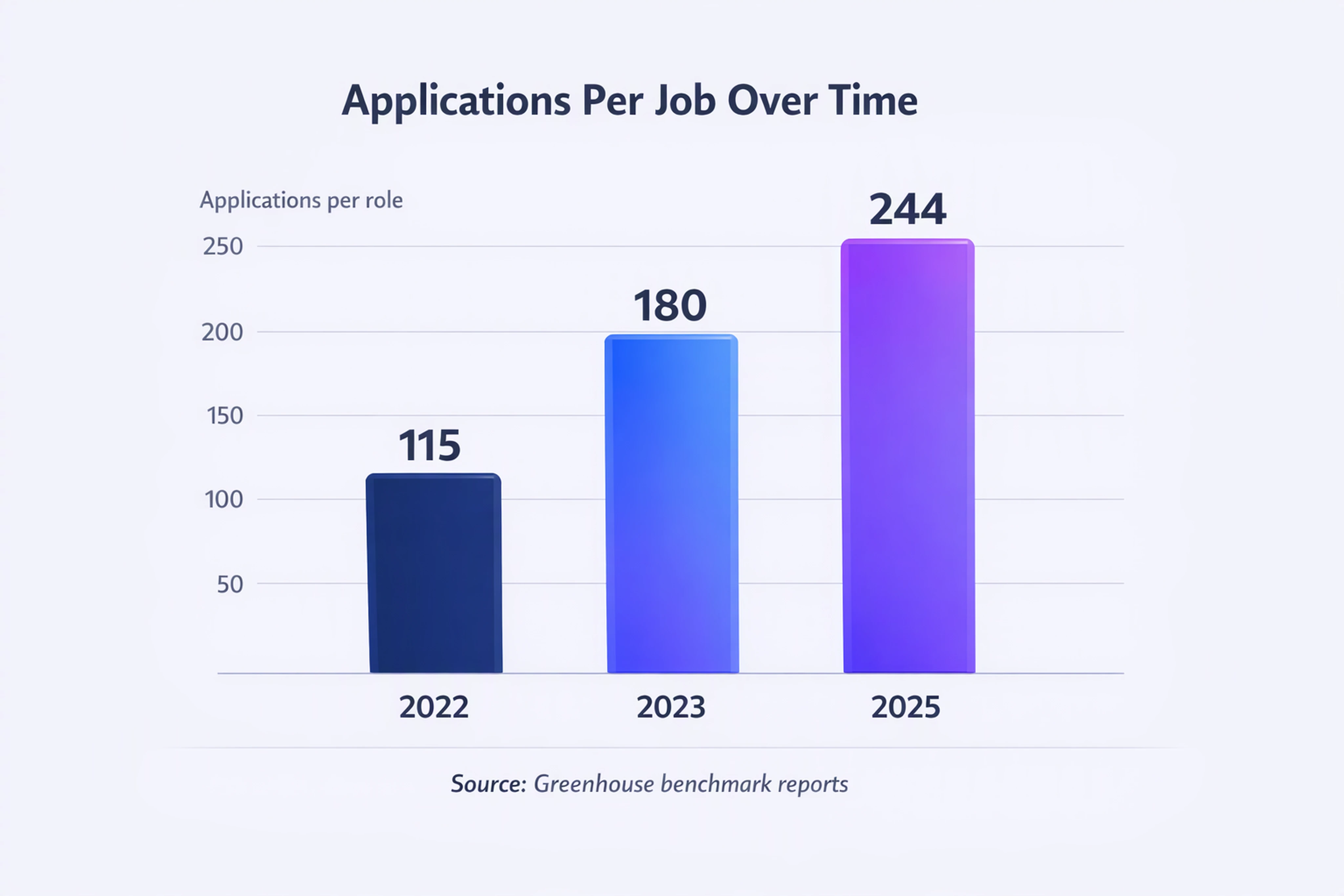
In a market where Greenhouse reports that applications per role rose from ~115 in 2022 to 244 in 2025 and recruiter application loads are up over 400%, both models make sense:
- Teal helps candidates stand out qualitatively.
- Tau helps candidates show up consistently and at scale.
When to Pair Tau and Teal: Building a Modern Job Search Stack
You don’t have to pick one or the other. Many candidates will get the most leverage by pairing Tau + Teal.
How to Use Them Together
A practical stack might look like this:
-
Start with Teal
- Import your LinkedIn profile.
- Build and refine your master resume.
- Use Teal’s analyzer and keyword tools to ensure your resume matches your target roles.
-
Connect Tau to your LinkedIn
- Let Tau scan LinkedIn for relevant Easy Apply roles.
- Decide whether you want approval mode or full Autopilot.
- Tau now submits 5–15 tailored applications per day while you work or study.
-
Track broader activity in Teal
- Use Teal’s job tracker for non-LinkedIn roles, referrals, and networking.
- Add notes, contacts, and follow-up reminders for interviews.
This gives you:
- Scheduled daily LinkedIn autopilot (Tau).
- Organized, multi-board job search workspace (Teal).
Recommendations by Job Seeker Type
Recent Graduates (22–26) Breaking into Their First Role
- Pain points: Limited experience, need practice applying, overwhelmed by volume on LinkedIn.
- Best fit:
- Tau to keep applications flowing to entry-level Easy Apply roles.
- Teal to learn how to structure a resume and track interviews.
- Recommendation: Start with Teal’s free tools, then add Tau for a 5–10-per-day LinkedIn pipeline once your resume is solid.
Early-Career Professionals (1–5 Years Experience) Looking to Upgrade
- Pain points: Working full-time, no bandwidth to apply consistently; want better pay/title.
- Best fit:
- Tau as the main engine for LinkedIn applications.
- Teal for targeted roles on other boards and tailored outreach.
- Recommendation: Invest in Tau’s mid-tier plan (10/day) to keep your pipeline full while using Teal to manage high-value roles and networking.
Mid-Level Professionals (5–10+ Years) Targeting Specific Roles
- Pain points: Quality matters more than raw volume; need precise alignment and strong narrative.
- Best fit:
- Teal as the primary hub for resume refinement, job tracking, and networking.
- Tau in approval mode, focusing on high-fit LinkedIn roles only.
- Recommendation: Use Teal+ for deep optimization; configure Tau conservatively (approval required) so you stay in full control.
Time-Strapped Career Changers or Remote Job Hunters
- Pain points: Limited time, need more shots on goal, exploring new industries or remote-only roles.
- Best fit:
- Tau to maintain a high-volume Easy Apply pipeline.
- Teal for strategy, learning, and tracking as you reshape your profile.
- Recommendation: Use Teal to craft a story that fits your new target field, then let Tau push that story into many LinkedIn applications daily.
Other Alternatives to Consider in 2026
If you’re exploring the best AI tools for LinkedIn job applications in 2026, Tau and Teal are part of a broader landscape:
- Simplify – Auto-apply for internships and early-career roles; especially popular with students. See the dedicated comparison: Is Simplify jobs legit? How Simplify compares to Tau for LinkedIn Easy Apply users.
- Jobscan – Strong resume keyword optimization and ATS scoring; “is Jobscan legit?” is a common question, and yes, it’s widely used for ATS alignment.
- Huntr – Job tracker and workspace similar to Teal, focused on organization and pipeline.
- Careerflow, jobcopilot, Copilot Careers – Various AI-assisted search tools, some with auto-apply, some more like workspaces.
You can often mix and match:
- Tau as your autopilot.
- Teal / Huntr as your workspace.
- Jobscan / Careerflow as your resume optimizer.
FAQ: Tau vs Teal for LinkedIn Job Search (2026)
1. Is Tau legit for LinkedIn job applications?
Tau is a real product used by 5,000+ candidates as of its public marketing. It connects to your LinkedIn account and applies on your behalf. However, Tau itself warns that LinkedIn does not permit automation, so while the tool is legit, using any auto-apply agent carries some account-risk. You should weigh that risk against the time saved and increased application volume.
2. Is Teal legit and safe for job tracking?
Teal reports serving 3.2M+ job searchers and 4M professionals, and it does not auto-apply. It focuses on resume optimization, job tracking, and LinkedIn profile suggestions. Its privacy policy states it does not sell personal information and only sends Gmail/calendar actions after approval, making it a low-risk, high-control option for most job seekers.
3. Should I use Tau with Teal or choose just one?
If your budget allows, using both together gives you the strongest stack:
- Tau for AI LinkedIn job search autopilot and daily Easy Apply volume.
- Teal for job tracking, resume optimization, and multi-board search.
If you must choose one:
- Pick Tau if your main problem is time and application volume.
- Pick Teal if your main problem is organization and resume/profile quality.
4. What’s the main difference between Tau and Teal in one sentence?
- Tau is an AI job search agent that finds and submits LinkedIn Easy Apply jobs for you.
- Teal is a career workspace that helps you prepare, optimize, and track your job search, but leaves sending applications manual.
5. Are AI job application tools scams or risky in 2026?
Most well-known tools like Tau, Teal, Jobscan, Simplify, Huntr are not scams, but they vary on risk:
- Tools that auto-apply on LinkedIn (Tau, some others) operate in tension with LinkedIn’s terms and carry account-risk.
- Tools that don’t auto-submit (Teal, Jobscan, Huntr) are generally safer and focus on optimization and tracking.
Always read:
- The tool’s privacy policy.
- How it uses your LinkedIn session and resume data.
- Whether it aligns with your risk tolerance and job search strategy.
Bottom line:
- Use Tau when you want an AI agent that applies for you on LinkedIn every day, within a daily limit (5 to 15 applications a day, depending on plan).
- Use Teal when you want a structured, low-risk career workspace that helps you optimize every application.
- Use both when you want automation as an advantage plus a clear, organized pipeline across your entire job search.